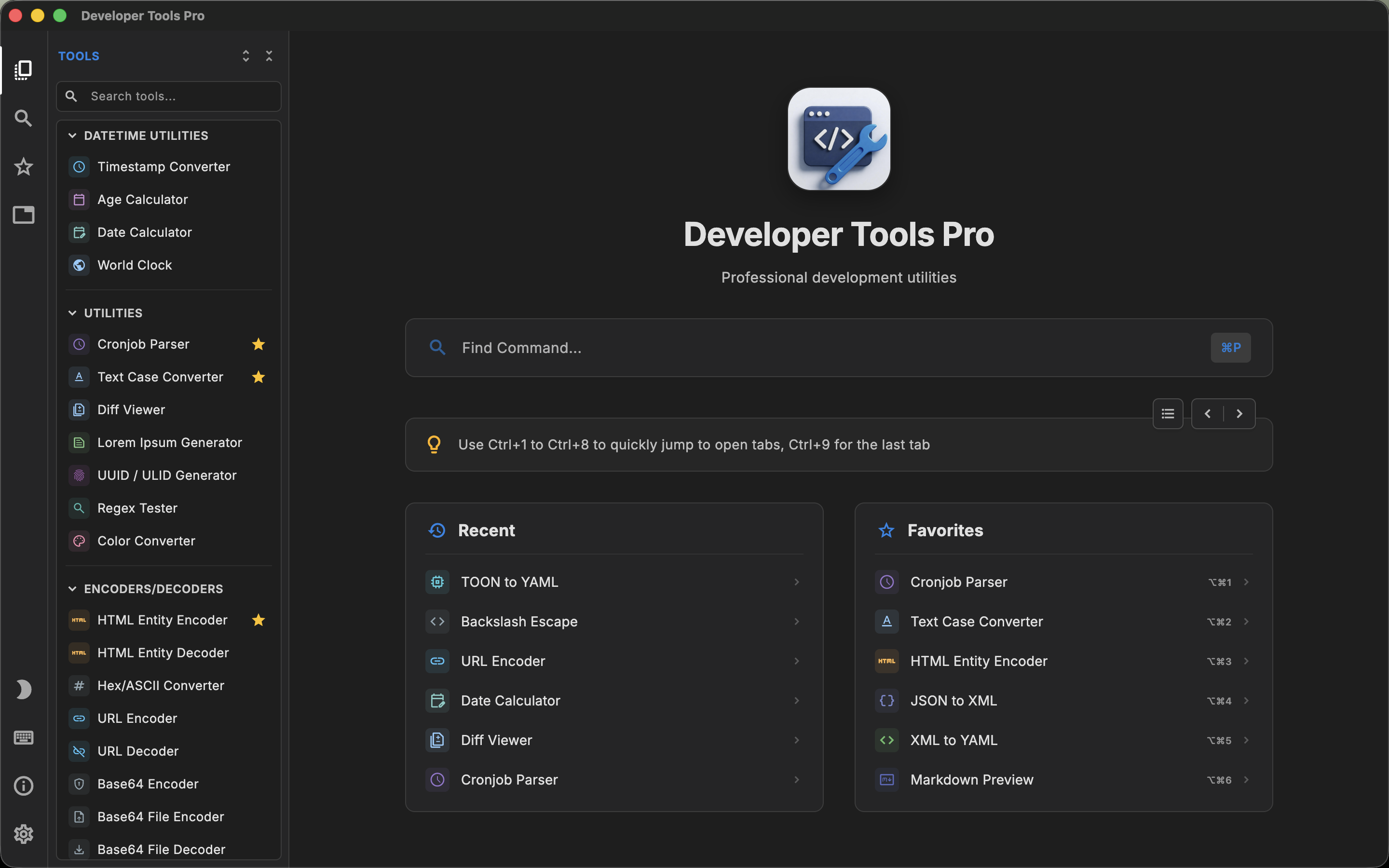
DevUtils and DevT Pro exist for essentially the same reason: developers repeatedly need small tools for JSON, Base64, JWTs, regular expressions, hashes, timestamps, conversions and code formatting, and using a separate website for each task becomes inefficient.
Both also make offline processing a central part of their value proposition.
For developers evaluating a DevUtils alternative, the difference comes down to scale and workflow. DevUtils is a focused, Mac-native application with strong clipboard-driven features. DevT Pro bundles a considerably larger catalog and crosses over to Windows, iPadOS and Linux.
What is DevUtils?
DevUtils is an offline developer toolbox built specifically for macOS.
Its current public catalog contains more than 47 tools covering many common development tasks, including:
- Unix timestamp conversion
- JSON formatting and validation
- Base64 text and image encoding
- JWT debugging
- Regex testing
- URL encoding and parsing
- HTML entity encoding
- UUID and ULID generation
- HTML preview
- Text diffing
- JSON and YAML conversion
- Number-base conversion
- HTML, CSS and JavaScript formatting
- XML formatting
- QR codes
- Hash generation
- Markdown preview
- SQL formatting
- String-case conversion
- Cron parsing
- Color conversion
- cURL-to-code conversion
- JSON-to-code conversion
- Certificate decoding
- Hex and ASCII conversion
This makes DevUtils substantially more capable than a single-purpose utility. It is a direct competitor to the all-in-one developer toolbox concept.
What is DevT Pro?
DevT Pro takes the same broad toolbox approach but currently includes more than 120 utilities.
Its toolbox is organized into categories including 46 converters, 19 code generators, 13 encoders and decoders, cryptography, date utilities, general utilities, validators and formatters, viewers and previewers, and QR tools.
There is considerable overlap with DevUtils. Both can handle everyday tasks such as JSON formatting, Base64 decoding, JWT decoding, regular-expression testing, timestamp conversion, UUID generation and JSON/YAML translation.
DevT Pro's main differentiation is the amount of functionality bundled into the application, particularly its converter matrix and code-generation tools.
Where the two apps overlap
For a developer evaluating these applications, the overlap is more important than their marketing descriptions.
Both products can replace a significant collection of websites. If your daily workflow includes formatting a JSON API response, decoding a JWT, testing a regular expression, converting a timestamp, generating a UUID or translating between JSON and YAML, either app covers much of that workflow.
Both also provide code-oriented editing rather than treating all input as a generic web form.
The decision becomes more interesting when you move outside that shared core.
DevUtils has a strong Smart Detection workflow
One of DevUtils' most distinctive features is Smart Detection.
The app can inspect clipboard content and determine an appropriate utility. A Unix timestamp can be identified as timestamp data, JSON can be routed toward its formatter, and Base64 content can be recognized for decoding.
For developers who frequently copy something from an IDE, terminal, browser or API client and immediately want to transform it, this can remove several steps. DevUtils also has status-bar integration around this workflow.
DevT Pro takes a different approach. Instead of making automatic clipboard detection the center of navigation, it provides a searchable command palette and keyboard navigation across the full toolbox. Its closest equivalent is Super Paste (⌘⇧V), which clears the input and pastes your clipboard into the open tool in one step, but it does not try to recognize what the clipboard contains.
Neither workflow is inherently superior. If you often think, "I copied this; figure out what tool I need," DevUtils' Smart Detection is attractive. If you already know which operation you want and prefer typing a few characters into a command palette, DevT Pro's approach may fit better.
Breadth of tools
DevUtils advertises more than 47 handcrafted tools. DevT Pro advertises more than 120.
Again, tool counts between applications should not be interpreted as exact equivalents because developers can group operations differently. But DevT Pro does cover a substantially larger number of individual transformations.
Its converters account for 46 tools alone, with transformations between JSON, XML, YAML, CSV, TSV, TOML and other structured formats. DevT Pro additionally includes 19 code generators.
DevUtils does have useful code-generation functionality, including cURL to Code and JSON to Code, so code generation is not exclusive to DevT Pro. DevT Pro simply makes it a larger standalone category.
For someone who primarily uses the common JSON/JWT/Base64/regex/hash set, the raw tool-count difference may not matter much. For someone who frequently jumps between data formats or generates code from structured input, it becomes more relevant.
DevUtils is more Mac-specific
DevUtils is a Mac application. That narrower focus allows it to build workflows around macOS. Features introduced over its lifetime include status-bar access, multiple windows, pop-out tools and Alfred integration. DevT Pro's counterpart is a companion Raycast extension that can launch any of its tools.
DevT Pro is cross-platform software available on macOS, Windows, iPadOS and Linux. That gives DevT Pro broader platform availability but makes the product philosophy different from a utility designed exclusively around macOS.
If all your development happens on a Mac, cross-platform availability may provide little value. If you use a Windows or Linux workstation and a MacBook, or want similar utilities on an iPad, DevT Pro's additional platforms are much more relevant.
Multi-tool workflow
DevUtils supports multiple windows and allows individual tools to be popped out.
DevT Pro instead provides a tab-oriented interface inside the main application. A typical DevT Pro session can keep a JSON utility open in one tab, a regex tester in another and a generator in another.
These solve a similar multitasking problem through different interface patterns. Developers who like traditional Mac windows may prefer DevUtils' model. Developers accustomed to IDEs and browsers may prefer keeping work consolidated into tabs.
Editors and structured data
Both applications pay more attention to developer input than a basic collection of web forms.
DevUtils' JSON formatter, for example, supports features including code folding and line numbers, while its wider toolbox includes dedicated previews and formatting interfaces.
DevT Pro similarly uses code-oriented editors with syntax highlighting, folding and find-and-replace functionality across text-heavy tools. DevT Pro also provides dedicated viewers for formats including JSON, CSV and YAML, plus HTML and Markdown previews.
This is a meaningful distinction between desktop developer toolboxes and simply bookmarking online utilities: the editing environment becomes part of the workflow.
The overall look differs too: DevT Pro draws its interface from code editors such as VS Code (tabs, a command palette and an editor-first layout), while DevUtils feels like a polished native Mac application.
Code generation
Both applications now cover code generation.
DevUtils includes cURL to Code and JSON to Code among its utilities.
DevT Pro currently groups 19 utilities under Code Generators, with examples including:
- JSON to TypeScript
- JSON to Swift
- cURL to Python
- cURL to Kotlin
- cURL to Rust
- cURL to Go
If these transformations are a major reason you want a developer toolbox, compare the exact target languages you use rather than relying solely on total tool counts. For many developers, one missing target language matters more than twenty unrelated utilities.
Offline processing and privacy
Both DevUtils and DevT Pro are designed to avoid the common workflow of pasting development data into online utilities.
DevUtils says it works entirely offline and that content pasted into the application stays on the machine.
DevT Pro similarly processes its tools locally with no account, telemetry or analytics; its only network access is explicit URL loading in previews and converters.
This overlap is important because it means privacy probably should not be the deciding factor between these two applications. Both are designed around local processing.
Pricing
Pricing differs considerably.
DevT Pro currently costs $9.99 as a one-time purchase for the complete application, including future updates.
DevUtils' direct-sale Basic license currently starts at $29 for one Mac. It is a perpetual license and includes one year of updates. If you do not renew after that year, the licensed version remains usable; renewal is only needed to continue receiving newer versions.
DevUtils also has a Personal tier for multiple Macs and team licensing, and the Mac App Store version is distributed as a free download with in-app purchases.
The products use different definitions of a "one-time purchase." DevT Pro's $9.99 purchase includes future updates. A direct DevUtils license is perpetual for the purchased software version but includes one year of new updates before an optional paid renewal.
When DevUtils may be the better fit
DevUtils makes a lot of sense if you want a developer toolbox built specifically around macOS.
Its Smart Detection feature is particularly useful if your workflow starts with copying data and letting the application determine what you can do with it.
Its status-bar workflow, multiple windows, pop-out tools and macOS integrations can also matter more than the total number of utilities.
And despite DevT Pro's larger catalog, DevUtils already covers a substantial portion of the everyday utilities many developers actually use. More tools only help when they are tools you need.
When DevT Pro may be the better fit
DevT Pro becomes more attractive if you want the largest possible built-in toolbox at a lower one-time price.
Its broader conversion matrix and 19 code generators are meaningful differences for developers who frequently transform data and source snippets.
The tab-based workflow is another differentiator if you prefer an IDE-like pattern over opening separate utility windows.
Its Windows, iPad and Linux versions are also relevant if your work is not exclusively Mac-based.
DevT Pro vs DevUtils: the practical difference
These are genuinely close competitors.
DevUtils feels more like a specialized Mac productivity application built around quickly recognizing and processing whatever is on your clipboard.
DevT Pro feels more like a large IDE-style catalog of developer utilities where you explicitly search for a tool and keep several tasks open in tabs.
If your priority is Smart Detection and macOS-specific workflow integration, DevUtils remains a strong option.
If your priority is maximum built-in breadth, more data conversions, more code-generation utilities, cross-platform availability and a lower upfront price, DevT Pro takes a different approach.