Boop is essentially a scriptable developer scratchpad: paste text, choose a transformation and continue working.
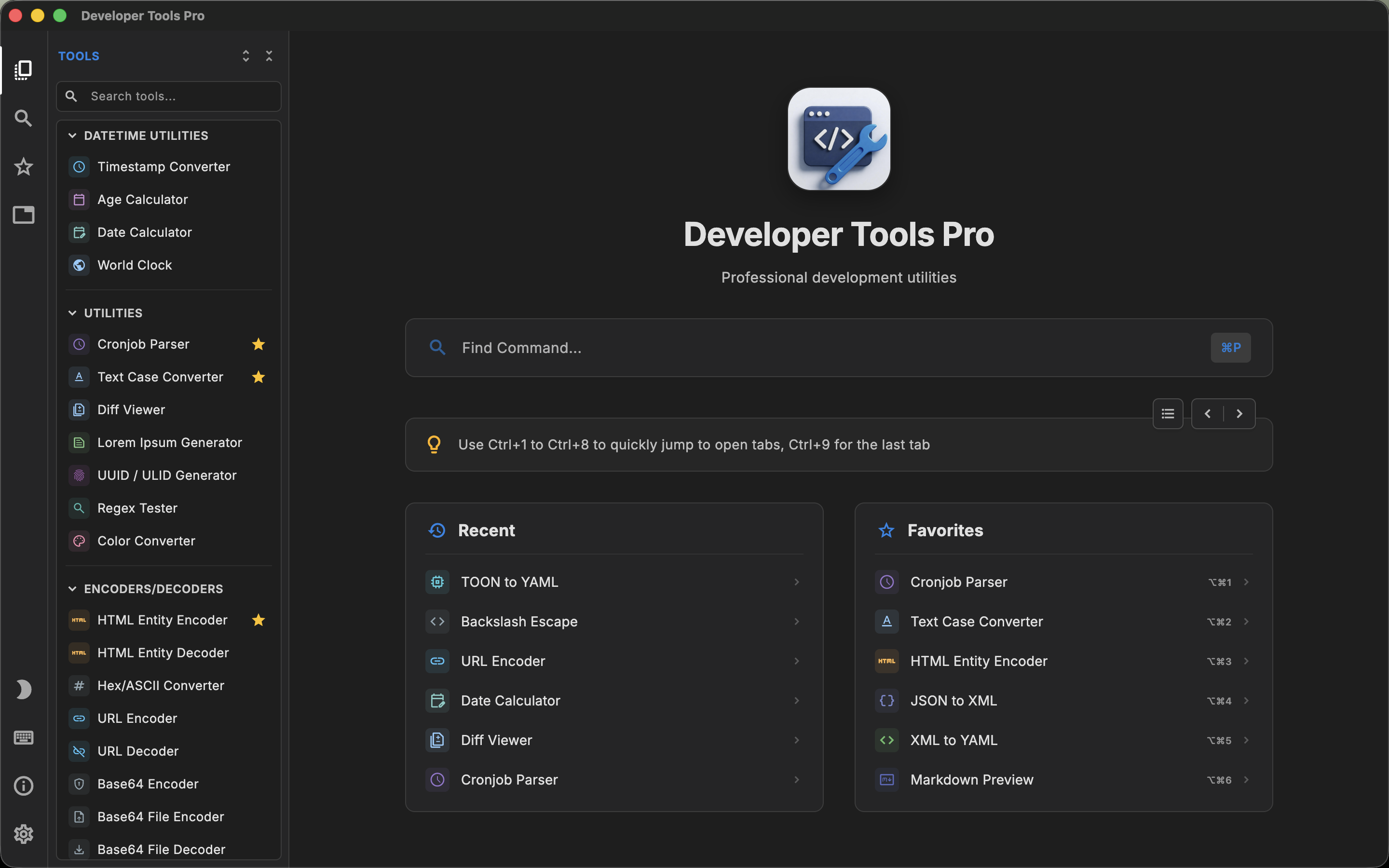
DevT Pro is a complete developer toolbox containing more than 120 dedicated utilities with separate interfaces for converters, formatters, validators, generators, viewers, cryptography and other tasks.
That is the real choice when considering a Boop alternative for Mac: a flexible text-transformation workflow, or a much larger collection of purpose-built utilities. It is not simply "which application has more tools?"
What is Boop?
Boop calls itself a scriptable scratchpad for developers. The basic workflow is deliberately simple:
- Open Boop.
- Paste some text.
- Open the script picker.
- Choose a transformation.
- Copy the result.
The script picker can be opened with a keyboard shortcut and searched without leaving the editor.
Built-in and community scripts cover many small operations developers otherwise perform using terminal commands, editor macros or websites. Examples include formatting structured text, encoding and decoding content, working with URLs and Base64, decoding JWTs, manipulating lines and converting timestamps.
But the most significant Boop feature is that its behavior is not limited to the scripts bundled by the developer.
Boop is scriptable
Boop supports custom JavaScript scripts.
A developer can create a small JavaScript file, expose it to Boop and turn it into another action in the script picker. That means an internal transformation specific to your project can live alongside the normal formatter and encoder actions.
There is also a community script repository where additional transformations can be shared.
This is the core of Boop's appeal. Instead of trying to ship a dedicated screen for every possible developer utility, Boop provides a text workspace plus a small scripting API. For the right developer, that flexibility can be more useful than a much larger fixed tool catalog.
Boop deliberately is not a full editor
Boop's documentation explicitly describes the application as something closer to an unstructured space for pasted text than a conventional file editor. For example, opening and saving files is not its primary goal.
This keeps the workflow lightweight. If all you want is somewhere to paste an escaped string, JSON payload or encoded value and transform it immediately, that minimalism is useful.
It also makes the comparison with DevT Pro straightforward. DevT Pro is designed around individual tools, structured interfaces, editors, viewers and multi-tab workflows. Boop is designed around one piece of text and a library of transformations.
What is DevT Pro?
DevT Pro contains more than 120 offline developer utilities. Its current catalog spans:
- 46 converters
- 19 code generators
- 13 encoders and decoders
- Cryptography
- Date utilities
- General utilities
- Validators and formatters
- Viewers and previewers
- QR code tools
Examples include JSON-to-YAML conversion, Base64 decoding, JWT decoding, URL encoding, hashing, AES encryption, timestamps, UUIDs, regex testing, cron parsing, diffing, JSON/XML/YAML validation, SQL formatting, Markdown preview and QR generation.
DevT Pro therefore overlaps with many things Boop scripts can do, but it presents those capabilities as dedicated tools rather than arbitrary text transformations.
Dedicated tools vs text transformations
This is the central comparison.
Suppose you need to decode Base64. In Boop, you paste the string, invoke the script picker and run the Base64 transformation. In DevT Pro, you open the Base64 decoder as its own tool.
For a straightforward transformation, both workflows can be quick. The difference becomes more apparent with utilities that need more structure.
- A regex tester benefits from separate pattern and input areas and visible match feedback.
- A converter benefits from input and output panes.
- A QR generator benefits from QR-specific options and a graphical result.
- A structured-data viewer benefits from a tree or table rather than transformed plain text.
A dedicated tool can provide more interface around the operation. A generic text-transformation model can be faster and more flexible when the operation itself is simple.
Custom scripting is Boop's major advantage
DevT Pro currently provides a large built-in tool catalog, but it does not advertise a comparable user-script system. Boop does.
If your team frequently performs custom text transformations, this difference can outweigh the number of built-in tools. For example, you could write a Boop script that cleans an internal identifier format, rewrites a proprietary log line or performs a transformation that would never be common enough to justify a dedicated utility in a general-purpose developer toolbox.
This is an important case where "120+ tools" does not automatically mean more capability for a particular developer. Boop can become whatever collection of text transformations you are willing to script.
DevT Pro goes further outside plain text
DevT Pro becomes more distinct when a workflow needs something more than transforming the current text buffer.
It includes dedicated viewers and previewers for formats such as JSON, CSV, YAML, HTML and Markdown. It has QR generation and reading. It has date utilities, cryptography and code-generation workflows.
Its code generators can transform JSON into models or cURL commands into source code for several languages.
That makes DevT Pro closer to an integrated developer utility suite, while Boop remains intentionally centered on the scratchpad.
Editors and multitasking
Boop gives you its main scratchpad and script picker.
DevT Pro uses proper code-oriented editors with syntax highlighting, code folding and find-and-replace features. It also allows several tools to remain open in tabs.
If you are simultaneously converting JSON, inspecting a JWT and testing a regular expression, the tab model gives each task its own state and interface.
If you normally work on one quick text transformation and immediately return to your IDE, Boop's simpler model may be preferable.
The two apps also look and feel different: DevT Pro's interface takes its cues from code editors such as VS Code (tabs, a command palette and an editor-first layout), while Boop stays a small, minimal native Mac utility.
Privacy
Both applications are designed as alternatives to submitting development data to arbitrary online tools.
Boop states that it does not collect user data. Its documentation notes that the non-App-Store build may contact a static endpoint to check for updates.
DevT Pro likewise processes everything locally, requires no account, and includes no telemetry or analytics; it only touches the network when you explicitly load a remote URL into a preview or converter.
For the actual transformation of development data, both are privacy-oriented local applications.
Open source and price
Boop is free and open source under the MIT license. That matters for two reasons: it costs nothing to use, and developers can inspect the application, contribute to it, build it themselves or modify its scripts.
DevT Pro is proprietary commercial software and currently costs $9.99 as a one-time purchase.
This is therefore not a comparison where DevT Pro can compete on being cheaper. The reason to pay for DevT Pro would be the additional built-in functionality and structured interfaces. If Boop already handles every transformation you need, paying for another toolbox may provide little benefit.
macOS compatibility
Boop is Mac-only and its current App Store listing supports macOS 10.14 or later.
DevT Pro supports macOS 13 or later and runs on both Intel and Apple silicon Macs. DevT Pro is additionally available on Windows, iPadOS and Linux.
Boop's narrower Mac-only scope fits its design as a small native Mac utility.
When Boop may be the better fit
Boop is a particularly good fit if most of your "developer utility" work consists of transforming text.
It is also compelling if you want to create your own actions. Developers who appreciate small native Mac apps, open-source software and keyboard-driven workflows may find that Boop solves the core problem without the overhead of a full toolbox.
And because it is free, there is very little downside to keeping it installed even if you use another utility suite as well.
When DevT Pro may be the better fit
DevT Pro is more appropriate if your needs have grown beyond a scriptable text scratchpad.
Dedicated regex testing, structured viewers, QR tools, cryptography, extensive format conversion and code generation fit more naturally into purpose-built interfaces.
Its tabs also make more sense when utilities become ongoing pieces of a development session rather than one-off transformations.
And if you want one comparable toolbox across macOS, Windows, iPad and Linux, Boop's Mac-only design cannot fill that role.
Boop and DevT Pro can also complement each other
Unlike some comparisons in this category, these applications do not have to be mutually exclusive.
Boop is free, small and uniquely scriptable. DevT Pro covers a much larger range of structured tasks. A developer could reasonably use Boop for ad-hoc text manipulation and custom transformations while using DevT Pro for more structured utilities.
That may actually be the most accurate way to think about the relationship between the two products.