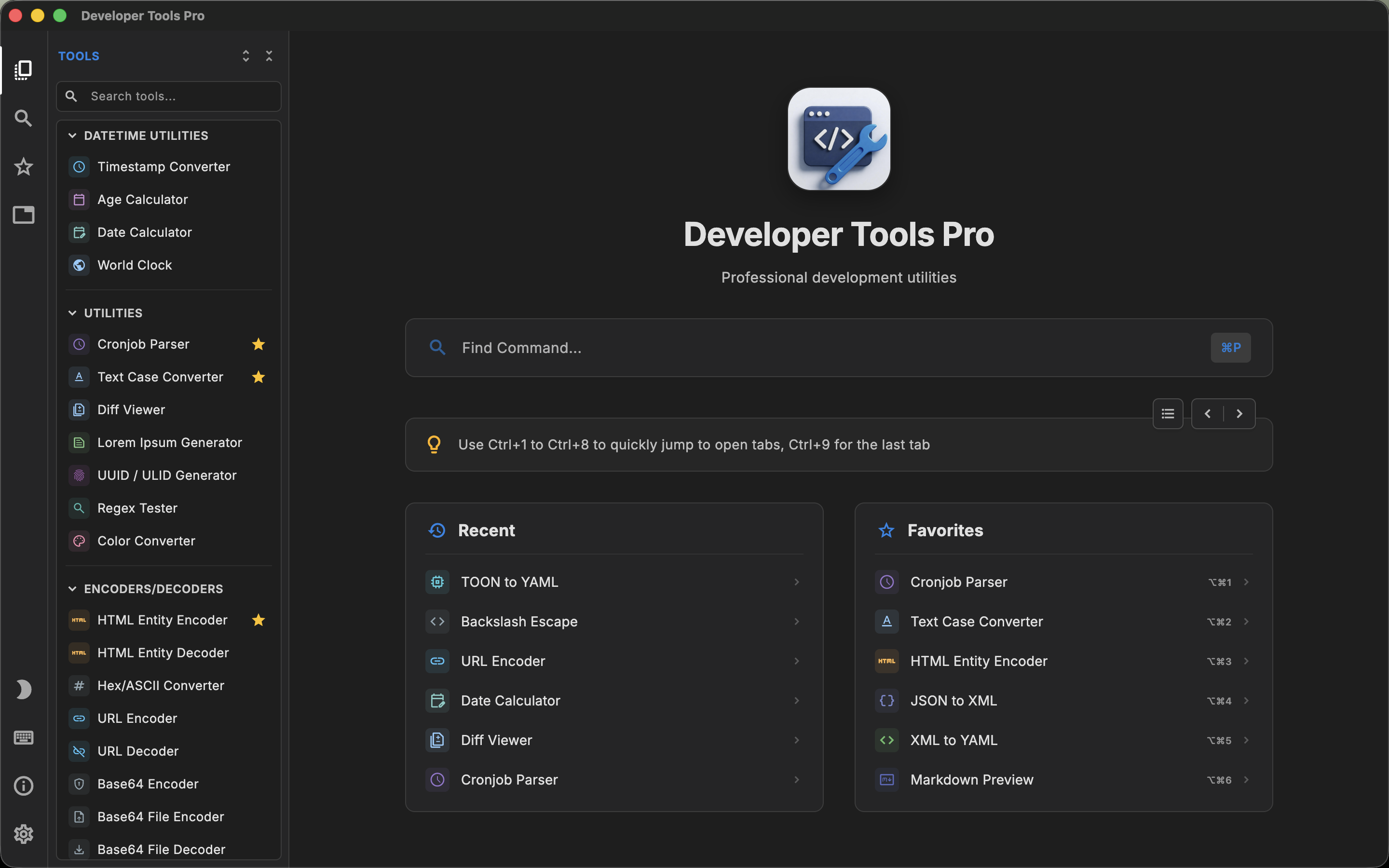
DevT Pro emphasizes breadth. It includes more than 120 tools across converters, encoders, generators, formatters, viewers, cryptography and other categories.
DevKnife has a much smaller catalog (roughly 30-plus tools), but several of those tools are deeper applications in their own right, such as a JSON editor, CSV editor, HTTP client, DNS inspector and SVG editor.
That makes total tool count particularly misleading in this comparison, and it is the main thing to keep in mind when evaluating a DevKnife alternative for Mac.
What is DevKnife?
DevKnife is a native macOS developer toolbox. Its current catalog includes tools such as:
- JSON Editor
- HTTP Client
- DNS Inspector
- Data Converter
- Regex Tester
- Text Compare
- JWT Debugger
- CSV Editor
- Cron Inspector
- URL Editor
- Markdown Editor
- HTML Editor
- Data Generator
- IP Location
- Port Scanner
- Hash Generator
- Text Inspector
- Time Inspector
- SVG Editor
- Password Generator
- Tailwind Colors
- Hex Viewer
- Network Information
- Base64 Image
- Certificate Inspector
- Code Statistics
That list illustrates an important difference from many developer toolboxes. Several DevKnife tools are relatively deep rather than being one-button transformations.
The JSON Editor, for example, supports tree-based inspection and JSONPath/JMESPath querying. The CSV Editor is designed as an editable table. The HTTP Client sends and inspects requests. DNS and network tools perform actual network-related inspection.
DevKnife is therefore not simply a set of encoders and converters.
What is DevT Pro?
DevT Pro contains more than 120 utilities. Its current catalog is larger but often more granular. It includes:
- 46 converters
- 19 code generators
- 13 encoders and decoders
- 3 cryptography tools
- Date utilities
- General developer utilities
- Validators and formatters
- Viewers and previewers
- QR tools
Typical tasks include converting between JSON, XML, YAML, CSV, TSV and TOML; generating models from JSON; converting cURL requests into source code; decoding Base64 and JWTs; hashing and encrypting text; testing regex; parsing cron expressions; viewing data; and generating QR codes.
The DevT Pro approach is therefore closer to providing a very large menu of focused development operations.
Breadth versus depth
This is the most useful way to compare the products. DevT Pro contains substantially more separately listed tools. DevKnife provides fewer tools, but some are more elaborate.
Consider JSON. DevT Pro has JSON converters, validation, formatting and viewing as part of its wider toolbox. DevKnife's JSON Editor is a more concentrated environment with features including tree inspection, querying with JSONPath and JMESPath, direct value editing and automatic repair of invalid data.
Or consider CSV. DevT Pro provides CSV conversion and viewing alongside the rest of its structured-data utilities. DevKnife includes a CSV Editor with spreadsheet-like editing, search, multi-cell selection, keyboard navigation, column reordering and delimiter switching.
Neither implementation makes the other irrelevant. They represent different product priorities.
DevKnife has stronger networking utilities
DevKnife contains several networking-oriented tools that are important to call out because they go beyond the normal developer toolbox basics.
Its current application includes an HTTP Client for sending and inspecting requests. It also has utilities including:
- DNS Inspector
- Port Scanner
- Domain/IP lookup functionality
- IP Location
- Network Information
- Certificate Inspector
The DNS Inspector can query records and check propagation across public resolvers. The Certificate Inspector can inspect local certificate files or connect to a remote host and evaluate its TLS certificate chain.
DevT Pro's public catalog is much more heavily oriented around local conversion, generation, formatting, validation and encoding tasks.
If network diagnostics and request testing are important to your workflow, DevKnife deserves serious consideration even though its total tool count is much lower.
DevT Pro has broader code generation and conversion
DevT Pro's major advantage lies in the opposite direction. Its current application contains 46 converters and 19 code generators.
The converter collection spans combinations between formats such as JSON, XML, YAML, CSV, TSV and TOML. The code-generation collection includes workflows such as:
- JSON to TypeScript
- JSON to Swift
- cURL to Python
- cURL to Kotlin
- cURL to Rust
- cURL to Go
For developers who repeatedly translate data between formats or move API examples from cURL into application code, the breadth of those operations can matter more than having networking inspectors.
This is why comparing only headline tool counts would produce a poor comparison.
Native Mac integration
DevKnife is explicitly a macOS product. It emphasizes being a native application and currently targets Apple Silicon Macs running macOS 14 or later.
That Mac-specific focus lets the developer add features that are difficult to justify in a cross-platform product. Recent versions have added support for:
- Finder Quick Look previews with syntax highlighting for numerous source-code, configuration and data file types
- macOS Shortcuts
- Command-line actions for selected lookups
- Recent files
- Multiple windows
- Saved Workspaces
These are meaningful product features and should not be reduced to individual "tool count" entries. DevKnife can be installed from the Mac App Store, directly from the developer, or through Homebrew.
DevT Pro is designed for macOS, Windows, iPadOS and Linux instead. That cross-platform scope is valuable if you use more than one operating system, but DevKnife goes deeper into some Mac-specific integrations. DevT Pro's Mac integrations lean developer-side (a companion Raycast extension can launch any tool), and its interface takes its cues from code editors such as VS Code rather than native macOS conventions.
Multitasking
DevKnife introduced multi-window support and later added Workspaces for preserving a window as a named session.
DevT Pro approaches multitasking through tabs. You can open multiple utilities inside the application and switch between them similarly to tabs in a browser or editor.
The practical difference is mostly workflow preference. If you want several independent Mac windows arranged across displays or Spaces, DevKnife's model is attractive. If you prefer keeping a developer toolbox consolidated into one window, DevT Pro's tab system may feel cleaner.
JSON and data editing
Developers who spend substantial time inspecting large JSON or CSV files should look beyond the marketing-level feature checklist.
DevKnife has invested heavily in editors. Its JSON tooling includes tree and query interfaces, JSONPath and JMESPath, direct value editing and performance work for large documents. Its CSV utility behaves more like a dedicated table editor than a basic CSV viewer.
DevT Pro offers structured viewers as part of the larger toolbox, alongside its converters and formatters. Its text-based utilities use code-oriented editors with syntax highlighting, folding and find-and-replace capabilities.
DevKnife therefore deserves the edge in this comparison if your priority is the depth of its specific JSON/CSV editing workflows rather than the number of different transformations available.
HTTP workflows
DevKnife includes a dedicated HTTP Client. This allows requests to be sent and inspected using headers, request bodies, variables and formatted responses.
DevT Pro's public catalog approaches API work differently. Its code-generation category includes multiple cURL-to-code transformations.
A common way to separate the two workflows: with DevKnife you construct and send the request inside the toolbox; with DevT Pro you take an existing cURL request and turn it into code for the application you are building. Those tasks are related but not equivalent.
Which is more valuable depends on whether you want an API client or a code-generation utility.
Privacy: an important nuance
Both applications are privacy-conscious and process ordinary tool data locally.
DevKnife states that it collects no telemetry or analytics and that users' documents stay on their Mac. Its documentation does note a few necessary connections around the product itself: the app connects to DevKnife servers for initial trial or license activation, and direct-download builds can check for updates.
Some individual network tools obviously also need network access to perform their function (for example, looking up DNS information or inspecting a remote certificate).
DevT Pro's tools likewise operate locally, with no telemetry or analytics, and the app makes no network requests on its own: the only network access is explicit, such as loading a remote URL into a preview or converter. Its catalog focuses on local conversion, generation, formatting and encoding tasks rather than network diagnostics.
Neither model is inherently problematic. They support different categories of tools. But developers handling sensitive data should understand the distinction.
Pricing
DevKnife provides a free 30-day trial and uses a one-time-payment model rather than a subscription.
DevT Pro does not use a subscription either. Its current price is $9.99 as a one-time purchase for the complete 120+ tool catalog and future updates.
Since DevKnife's offers and purchase channels can change, its current purchase price should be checked when buying rather than relying on an old comparison article.
The more important structural difference is that both products are available without an ongoing subscription.
System requirements
DevKnife currently focuses on Apple Silicon and macOS 14 or later.
DevT Pro supports macOS 13 or later and supports both Intel and Apple Silicon Macs.
That makes DevT Pro relevant to a modestly broader range of Macs. For users already on a recent Apple Silicon system, the distinction is less important.
When DevKnife may be the better fit
DevKnife makes particularly good sense if you want deeper Mac-specific tools rather than the largest catalog.
Its HTTP client, networking utilities, certificate inspection, rich JSON and CSV editors, Quick Look integration and macOS Shortcuts support are meaningful features that cannot be represented fairly by a simple tool-count comparison.
It is also a strong choice for developers who prefer a native Mac application designed specifically around Apple's platform.
When DevT Pro may be the better fit
DevT Pro becomes more attractive when breadth matters.
Its 120+ tools cover far more individual data transformations, encoders, validators and generators. Its 19 code generators are especially relevant if converting JSON or cURL into application code is a recurring task.
It also supports Windows, iPadOS and Linux in addition to macOS, works on Intel Macs, and currently has a very low one-time purchase price.
DevT Pro vs DevKnife: the practical difference
DevKnife and DevT Pro demonstrate why "number of developer tools" is not enough to compare toolbox applications.
DevT Pro gives you substantially more individual utilities. DevKnife turns several of its tools into richer mini-applications.
Choose based on the workflows you actually perform. If you want an HTTP client, network inspection, sophisticated JSON/CSV editing, Finder Quick Look and deep Mac integration, DevKnife offers capabilities worth considering independently of its smaller catalog.
If you want an expansive collection of converters, code generators, encoders, validators and offline everyday utilities available on several platforms, DevT Pro takes the broader approach.