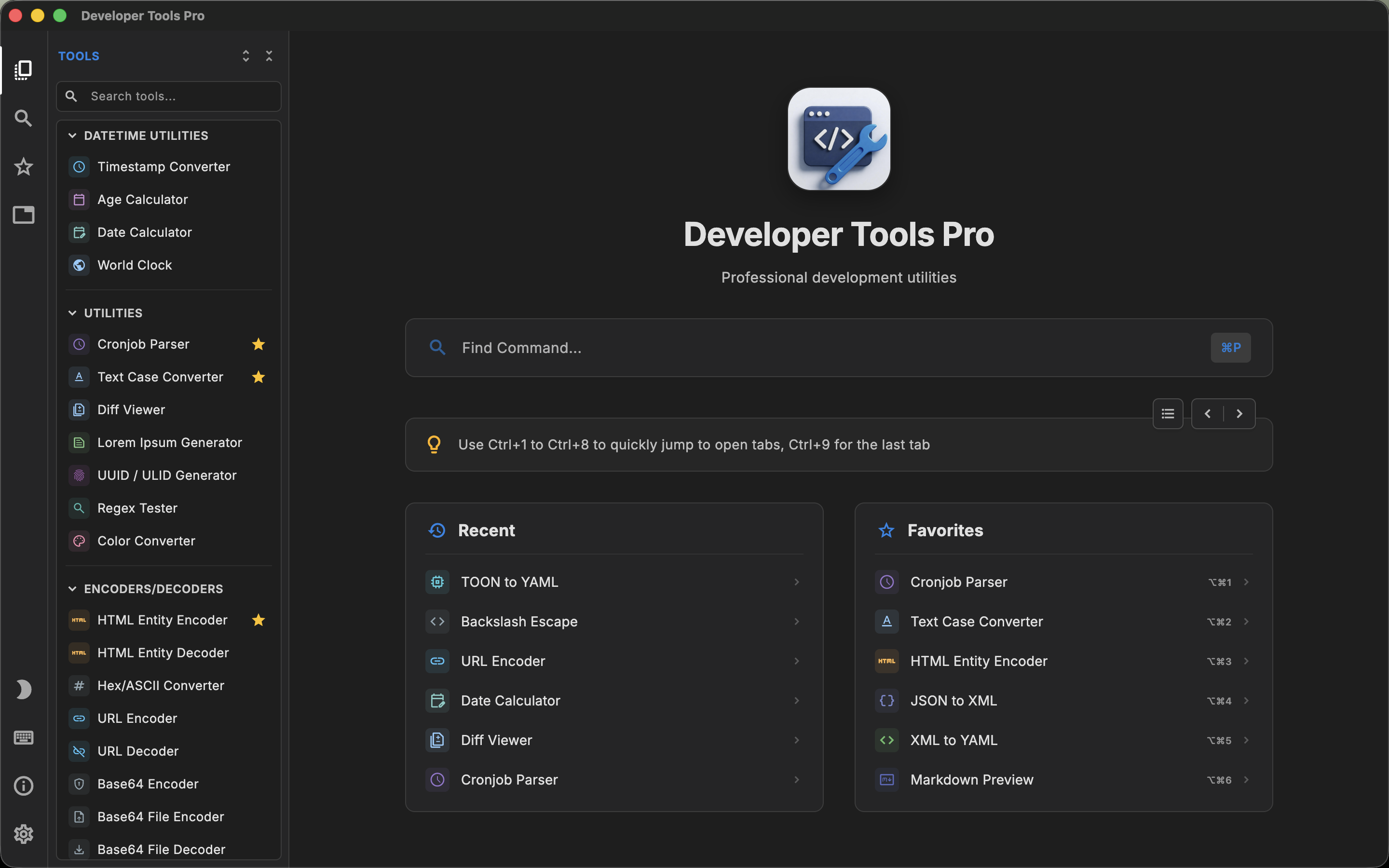
DevToys and DevT Pro solve a very similar problem. Developers regularly need to format JSON, decode Base64 or JWTs, test regular expressions, generate identifiers, compare text, calculate hashes or convert data between formats. Opening a different website for each operation is inconvenient, and it can also be undesirable when the input contains private development data.
Both applications bring those utilities into a desktop app and make local processing a central part of the experience.
For anyone evaluating a DevToys alternative for Mac, the bigger difference is product philosophy. DevToys currently ships with around 30 default tools and can be expanded through community extensions. DevT Pro includes more than 120 tools directly in the app and focuses on breadth without requiring an extension ecosystem.
Does DevToys work on Mac?
Yes. Current DevToys releases support macOS, Windows and Linux.
There is some understandable confusion around this because an older separate project named DevToys for Mac also exists and is listed on software directories as discontinued. That older project is not the same product as the current cross-platform DevToys.
DevToys 2.x was rewritten as a cross-platform application and now provides official macOS builds for both Intel and Apple silicon Macs. It can also be installed on macOS through Homebrew.
This comparison uses the current DevToys application. It does not compare DevT Pro with the discontinued third-party “DevToys for Mac” project.
What is DevToys?
DevToys describes itself as a Swiss Army knife for developers. Its default toolbox covers many of the small operations that tend to interrupt normal development work.
Current default tools include areas such as:
- JSON and YAML conversion
- JSON array to table and CSV conversion
- Date and number-base conversion
- Base64 text and image encoding
- JWT encoding and decoding
- GZip, HTML and URL encoding
- QR code generation and reading
- JSON, SQL and XML formatting
- Hashes and checksums
- Password and UUID generation
- Text and list comparison
- Markdown preview
- Regular-expression testing
- JSONPath testing
- XML and XSD tools
- Image conversion
The default tool count does not describe the full DevToys ecosystem, because DevToys supports extensions. Additional tools can be installed, and developers can create their own extensions using the DevToys SDK.
That extensibility is one of the most important differences between DevToys and DevT Pro.
What is DevT Pro?
DevT Pro is also an offline developer toolbox, but it takes a more bundled approach. Instead of starting with a smaller core and relying on extensions for additional functionality, DevT Pro currently ships with more than 120 developer utilities.
The current toolbox includes 46 converters, 19 code generators, 13 encoders and decoders, cryptography tools, date utilities, validators and formatters, viewers and previewers, QR tools and other development utilities.
Examples include:
- JSON to YAML and other structured-data conversions
- JSON, XML and YAML validation and formatting
- Base64 and URL encoding and decoding
- JWT decoding
- Hash generation and encryption utilities
- UUID and ULID generation
- Regular-expression testing
- Text diffing and cron parsing
- JSON, CSV and YAML viewers
- HTML and Markdown preview
- QR generation and QR reading
- JSON-to-model and cURL-to-code generation
The emphasis is on having a broad set of tools immediately available in one application rather than requiring users to discover and install additional packages.
Built-in tools vs extensions
This is the clearest architectural difference between the two products.
DevToys comes with around 30 tools by default. The application stays relatively focused, while its extension system allows the community to add additional capabilities. DevToys lists third-party tools such as JSON Schema utilities, JSON-to-language converters, RSA generation, ULID generation and other extensions.
DevT Pro ships more functionality directly. Its catalog contains more than 120 utilities without requiring an extension marketplace.
Tool counts are not perfectly comparable. One product may describe two conversion directions as a single tool while another may expose them as separate utilities. The headline numbers are therefore better understood as an indication of product philosophy than as a benchmark.
If you enjoy building and customizing your own development environment, DevToys' extension system is a substantial advantage. If you would rather install one application and have a wide collection immediately available, DevT Pro follows that model more closely.
Extensibility is one of DevToys' strongest features
DevToys provides an SDK specifically for adding tools to the application. Extensions can be developed by the community and loaded into DevToys without changing the main application itself.
It also has a separate DevToys CLI. Tools that make sense in a terminal environment can be used from the command line, including in automation and CI scenarios.
DevT Pro currently focuses on the utilities shipped as part of the product and does not offer an equivalent extension SDK or third-party marketplace.
For developers who want to add custom tools themselves, this is a real reason to choose DevToys rather than simply comparing how many utilities each application includes today.
Finding the right tool
DevToys and DevT Pro also take different approaches to navigating a large toolbox.
DevToys: Smart Detection
DevToys can inspect clipboard content and suggest tools that match the detected data. If the clipboard looks like something a particular utility understands, the app can surface that tool and optionally paste the content automatically.
DevToys 2.x also supports chaining tools, allowing output from one operation to flow into another.
DevT Pro: command palette and tabs
DevT Pro uses a searchable command palette to reach its tool catalog. It is designed around keyboard navigation, so a developer who already knows the operation they want can search for it directly.
DevT Pro also keeps tools in tabs. A JSON converter can remain open while you test a regular expression in another tab and generate an identifier in a third.
DevT Pro does not inspect the clipboard to suggest a tool, but it does offer Super Paste (⌘⇧V), a shortcut that clears the input and pastes your clipboard into the open tool in one step. On the Mac, a companion Raycast extension can also launch any tool directly.
The two workflows solve different problems. DevToys is particularly convenient when the workflow starts with data already in your clipboard. DevT Pro is closer to an IDE or browser model where you explicitly open and retain several working contexts.
Editors and developer-focused input
Both applications provide more than plain text boxes.
DevToys includes a rich code editor and has used Monaco, the editor technology associated with Visual Studio Code, to provide features such as syntax-aware editing.
DevT Pro similarly uses code-oriented editors for its text-heavy tools, with syntax highlighting, code folding and find-and-replace functionality.
This makes both products substantially more comfortable for structured data than a typical single-purpose web utility.
Visually, the two apps also take different directions: DevT Pro's interface draws on code editors such as VS Code (tabs, a command palette and an editor-first layout), while DevToys uses a more conventional desktop utility design.
Code generation
Code generation is a larger built-in category in DevT Pro.
DevT Pro currently includes 19 code generators, covering workflows such as generating typed models from JSON and converting cURL requests into source code for languages including Python, Kotlin, Rust and Go.
DevToys can gain additional generation capabilities through extensions, and its community ecosystem includes tools such as JSON-to-language converters.
This is another example of the broader product difference: DevT Pro packages more of these operations into the default application, while DevToys can extend beyond its default set through installable tools.
Privacy and offline use
Both applications are strong alternatives to pasting source data into unrelated web utilities.
DevToys describes itself as privacy-focused and provides its default developer tools for offline use.
DevT Pro processes its tools locally, requires no account, and includes no telemetry or analytics. The only network access is explicit: when you ask a preview or converter to load a remote URL.
This is particularly useful for API responses, configuration files, encoded values, tokens and other development data that may contain internal or sensitive information.
Privacy is therefore an area where the products share more than they differ.
Platform support
DevToys currently supports:
- macOS
- Windows
- Linux
DevT Pro currently supports:
- macOS
- Windows
- iPadOS
- Linux
For a Mac-only comparison, both products qualify.
The difference matters more if you work across operating systems. Both products cover macOS, Windows and Linux. Developers who want the same toolbox available on an iPad have a reason to consider DevT Pro.
DevT Pro currently supports macOS 13 or later and both Intel and Apple silicon Macs. DevToys also distributes separate Intel and Apple silicon macOS builds.
Pricing and licensing
DevToys is free and open source.
That is a meaningful advantage if you specifically prefer software that can be inspected, modified and built by the community.
DevT Pro is proprietary commercial software. The complete application currently costs $9.99 as a one-time purchase and includes all 120+ tools with no subscription, ads or account.
The value proposition is therefore not that DevT Pro is cheaper than DevToys; it cannot be cheaper than free. The reason to choose DevT Pro would be its larger ready-made catalog, code-generation coverage and preferred workflow.
When DevToys may be the better fit
DevToys deserves serious consideration if open source is important to you, or if you want a toolbox that can grow through extensions.
Its SDK, community tools and dedicated CLI all extend the product beyond the normal desktop-utility use case.
Smart Detection can also be a particularly convenient workflow if you regularly copy a value from an editor or terminal and immediately need to transform it.
When DevT Pro may be the better fit
DevT Pro is aimed more directly at developers who want a large pre-built toolbox.
Its 120+ included utilities provide broad coverage without installing extensions, while its 46 converters and 19 code generators make structured-data transformation and source-code generation substantial parts of the product.
The command palette and tab-based interface can also be useful if multiple developer utilities remain open throughout a work session.
And for developers moving between macOS, Windows, iPadOS and Linux, DevT Pro covers that particular combination of platforms.
DevT Pro vs DevToys: the practical difference
DevToys and DevT Pro belong to the same category, but they are not trying to solve it in exactly the same way.
DevToys is best understood as an open and extensible developer toolbox. It includes a focused default toolset and provides extensions, an SDK and a CLI for developers who want to expand or automate it.
DevT Pro is better understood as a large ready-made developer toolbox. It bundles a wider collection of converters, encoders, generators, validators, viewers and other utilities into the application from the start.
If open source, custom extensions or terminal integration are priorities, DevToys has clear advantages.
If you prefer a broad built-in catalog, extensive code generation and a tab-oriented workflow, DevT Pro offers a different trade-off.
Neither choice requires sending everyday development data to a collection of unrelated online tools.