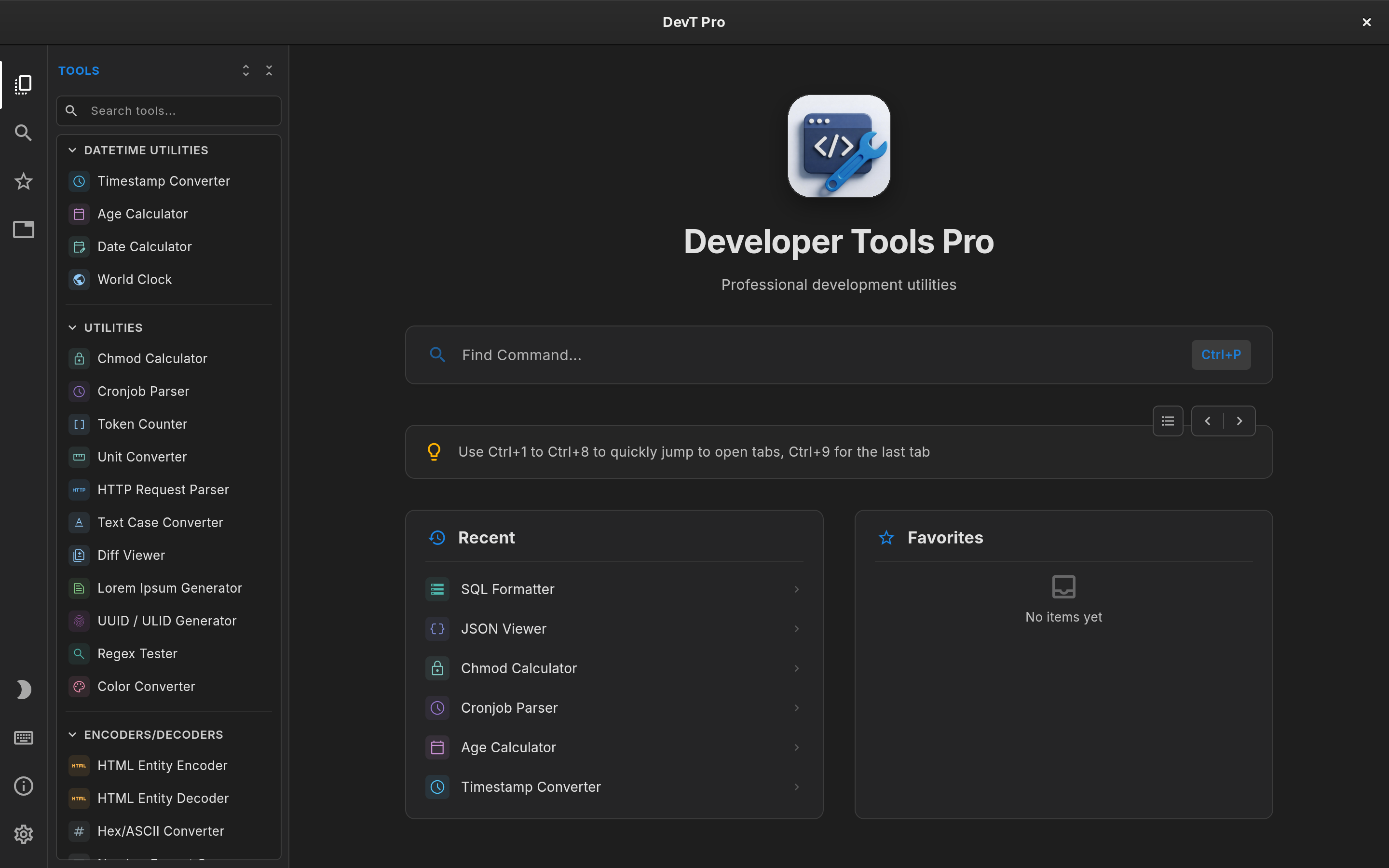
Linux developer toolbox comparison

Boop Alternative for Linux: DevT Pro vs Boop

Boop is a much-loved, scriptable text scratchpad, but the original project only runs on macOS. On Linux, DevT Pro offers a different take on the same need: 120+ dedicated developer tools in one offline app, installed as a Flatpak or a Snap.

Updated October 2026 Linux · Developer tools

$5.99 once · 120+ tools · No subscription · No account

DevT Pro on Linux: tool explorer, tabs and the command palette

The quick verdict

Choose DevT Pro if you want

  • A developer toolbox that runs on Linux today
  • 120+ dedicated tools, viewers and code generators
  • Tabs and a command palette for working in parallel
  • $5.99 once, with no subscription

$5.99 once · no subscription

Boop may suit you better if

  • You work on a Mac and want custom JavaScript scripts
  • Free, open-source software matters most to you

Why developers switch from Boop

Linux Flatpak and Snap

The original Boop is macOS only. DevT Pro is on Flathub and the Snap Store.

120+ dedicated tools

Purpose-built interfaces and options, not a script run over one text box.

Tabs work in parallel

Keep JSON, JWT and regex tabs open side by side.

19 code generators

Typed models from JSON in 8 languages and cURL to code in 11.

Does Boop run on Linux?

The original Boop project is a macOS app and does not publish Linux builds. If Boop was part of your workflow on a Mac, you will need something else on a Linux workstation.

DevT Pro installs from Flathub or the Snap Store on x86_64 Linux, so it works on any distribution with Flatpak or Snap support and updates through your software center.

Scratchpad vs dedicated toolbox

Boop is deliberately simple: paste text into one scratchpad, run a transformation, copy the result. That simplicity is its appeal.

DevT Pro gives each job its own tool, with an input editor, an output editor and the options that job needs. A JSON to YAML converter, a JWT decoder and a regex tester each have an interface designed for that task, and results update as you type.

Custom scripts are Boop’s real advantage

Boop lets you write your own JavaScript transformations and share them with others. DevT Pro has no comparable scripting system.

On Linux, many quick text transformations are already handled in the terminal with jq, sed or base64. Where DevT Pro adds value is the visual side: structured viewers, validators and generators with proper editors, plus a command-line tool and MCP server coming in v9 so the same tools also fit into pipelines.

Where DevT Pro goes further

Beyond text transformation, DevT Pro includes 46 converters across JSON, XML, YAML, CSV, TSV, TOML and TOON, 19 code generators for typed models and cURL to code, viewers for JSON, CSV and YAML, HTML and Markdown previews, and QR tools.

Working in parallel

Boop is one scratchpad. DevT Pro keeps tools in tabs, including several copies of the same tool, and each tab remembers its content while you work elsewhere. Ctrl+P opens any tool, and Super Paste (Ctrl+Shift+V) replaces an editor’s content with your clipboard in one step.

Open source vs commercial

Boop is free and open source. DevT Pro is commercial software.

On Linux, DevT Pro is unlocked with a one-time $5.99 license key that includes all 120+ tools. You activate it once in the app; the license is then remembered, so DevT Pro keeps working offline. Moving to a new computer is a matter of deactivating the key in Settings → License and activating it again.

Privacy

Both process text locally. DevT Pro has no account, telemetry or analytics, and on Linux only goes online to activate the license or when you ask it to load a URL.


At a glance

DevT Pro vs Boop on Linux

A practical comparison of the differences that matter on a Linux desktop. Product capabilities can change, so check each product's current documentation before purchasing.

Feature DevT Pro Boop
Linux support Yes: Flatpak and Snap, x86_64 No (original project is macOS only)
Core model Dedicated developer tools Scriptable text scratchpad
Built-in catalog 120+ tools Built-in transformation scripts
Custom JavaScript scripts No Yes
Structured viewers Yes Not the core model
Code generators 19 built-in tools Possible through scripts
Tabs / parallel tasks Yes Single scratchpad
Command-line tool Coming in v9 No
Offline processing Yes Yes
Open source No Yes
Price $5.99 one-time license key Free
Questions

Boop alternative for Linux FAQ

Is Boop available for Linux?
The original Boop project is macOS only and does not publish Linux builds.
Can DevT Pro run custom scripts like Boop?
No. DevT Pro has no scripting system. It ships 120+ dedicated tools instead, and a command-line tool is coming in v9 for use in shell pipelines.
How do I install DevT Pro on Linux?
Install it from Flathub or the Snap Store, then activate it with a one-time $5.99 license key.
Does DevT Pro work offline on Linux?
Yes. After a one-time activation the license is remembered and every tool runs locally.

Sources

Product information was checked against current public product pages and documentation in October 2026.

DevT Pro for Linux

The Boop alternative for Linux

Converters, code generators, encoders, validators, formatters, cryptography, viewers, QR tools and more. No account, ads or subscription.

$5.99 one-time license · All 120+ tools · Flatpak and Snap · No subscription
DevT Pro 120+ developer tools · $5.99 once