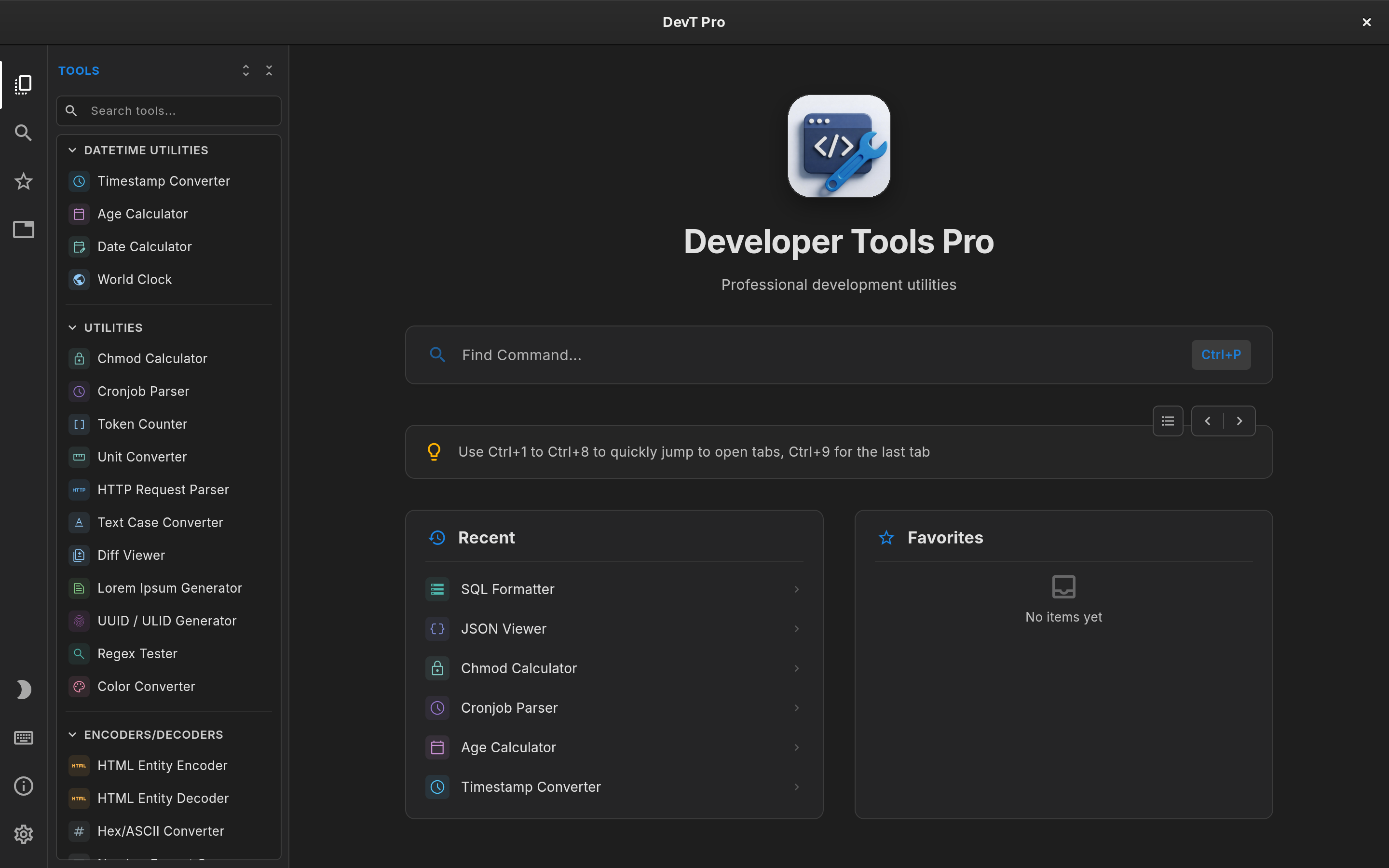
Linux developer toolbox comparison

DevKnife Alternative for Linux: DevT Pro vs DevKnife

DevKnife is a native Mac toolbox with some deep tools, such as a JSON editor, a CSV editor and an HTTP client, but it does not run on Linux. DevT Pro does, as a Flatpak and a Snap, with a broader catalog of more than 120 offline developer utilities.

Updated October 2026 Linux · Developer tools

$5.99 once · 120+ tools · No subscription · No account

DevT Pro on Linux: tool explorer, tabs and the command palette

The quick verdict

Choose DevT Pro if you want

  • A developer toolbox that runs on Linux today
  • 120+ tools, including 46 converters and 19 code generators
  • Tabs and a command palette for working in parallel
  • $5.99 once, with no subscription

$5.99 once · no subscription

DevKnife may suit you better if

  • You work on a Mac and want a built-in HTTP client or network tools
  • You want dedicated JSON and CSV editors

Why developers switch from DevKnife

Linux Flatpak and Snap

DevKnife is Mac only. DevT Pro is on Flathub and the Snap Store.

120+ tools vs 30+

Breadth across converters, encoders, generators, formatters and viewers.

46 converters

JSON, YAML, XML, CSV, TSV, TOML and TOON in every direction.

19 code generators

Typed models from JSON in 8 languages and cURL to code in 11.

Is there a DevKnife for Linux?

No. DevKnife is built for macOS and requires an Apple silicon Mac running macOS 14 or later. There is no Linux or Windows edition.

DevT Pro installs from Flathub or the Snap Store on x86_64 Linux, so it works on any distribution with Flatpak or Snap support and updates through your software center.

Breadth versus depth

DevKnife has roughly 30-plus tools, several of which are full applications in their own right. DevT Pro has more than 120, focused on the transformations developers do every day.

That means the comparison is less about counts and more about which kind of work you do most.

Networking tools on Linux

DevKnife includes an HTTP client, DNS lookups, a port scanner and certificate inspection. DevT Pro does not try to duplicate those.

On Linux, most developers already reach for curl, dig, nc and openssl for that work, and DevT Pro complements them: paste a cURL command into cURL to code to get Python, Go, Rust and eight more languages, or drop an API response into a JSON viewer or converter.

Where DevT Pro is broader

DevT Pro includes 46 converters across JSON, XML, YAML, CSV, TSV, TOML and TOON, and 19 code generators for typed models and HTTP clients. It also covers JWTs, Base64, hashing and encryption, regex, diffing, cron parsing, previews and QR codes.

A keyboard-first Linux workspace

Tools open in tabs you can pin, rename, duplicate and reorder, with several copies of the same tool open at once. Ctrl+P finds any tool, and the window title bar follows your light or dark theme.

A command-line tool and MCP server for AI agents are coming in v9, designed to ship inside the Flatpak and Snap packages.

Privacy

DevT Pro has no account, telemetry or analytics and makes no background network connections. On Linux it only goes online to activate your license or when you ask it to load a URL.

Pricing

DevKnife offers a 30-day trial and a one-time purchase on macOS.

On Linux, DevT Pro is unlocked with a one-time $5.99 license key that includes all 120+ tools. You activate it once in the app; the license is then remembered, so DevT Pro keeps working offline. Moving to a new computer is a matter of deactivating the key in Settings → License and activating it again.


At a glance

DevT Pro vs DevKnife on Linux

A practical comparison of the differences that matter on a Linux desktop. Product capabilities can change, so check each product's current documentation before purchasing.

Feature DevT Pro DevKnife
Linux support Yes: Flatpak and Snap, x86_64 No (macOS 14+, Apple silicon)
Catalog size 120+ tools Roughly 30+ tools
Converters 46 built-in tools Multi-format converter
Code generators 19 built-in tools Not a primary category
JSON / CSV editing Viewers, formatters, converters Dedicated JSON and CSV editors
HTTP client / network tools No (use curl, dig, openssl) Yes
Tabs / multiple instances Yes Multi-window + Workspaces
Command-line tool Coming in v9 No
Offline processing Yes Yes for local tools
Price $5.99 one-time license key One-time purchase, 30-day trial (macOS)
Questions

DevKnife alternative for Linux FAQ

Does DevKnife run on Linux?
No. DevKnife is a macOS app that needs an Apple silicon Mac running macOS 14 or later.
Does DevT Pro include an HTTP client?
No. DevT Pro focuses on transformations, formatting, encoding and code generation. It can turn cURL commands into code for 11 languages.
How do I install DevT Pro on Linux?
Install it from Flathub or the Snap Store, then activate it with a one-time $5.99 license key.
Does DevT Pro work offline on Linux?
Yes. After a one-time activation the license is remembered and every tool runs locally.

Sources

Product information was checked against current public product pages and documentation in October 2026.

DevT Pro for Linux

The DevKnife alternative for Linux

Converters, code generators, encoders, validators, formatters, cryptography, viewers, QR tools and more. No account, ads or subscription.

$5.99 one-time license · All 120+ tools · Flatpak and Snap · No subscription
DevT Pro 120+ developer tools · $5.99 once